
SmartPhone Navigator1.31 - App Store
You'll be able to see results in few seconds.
Publisher Description
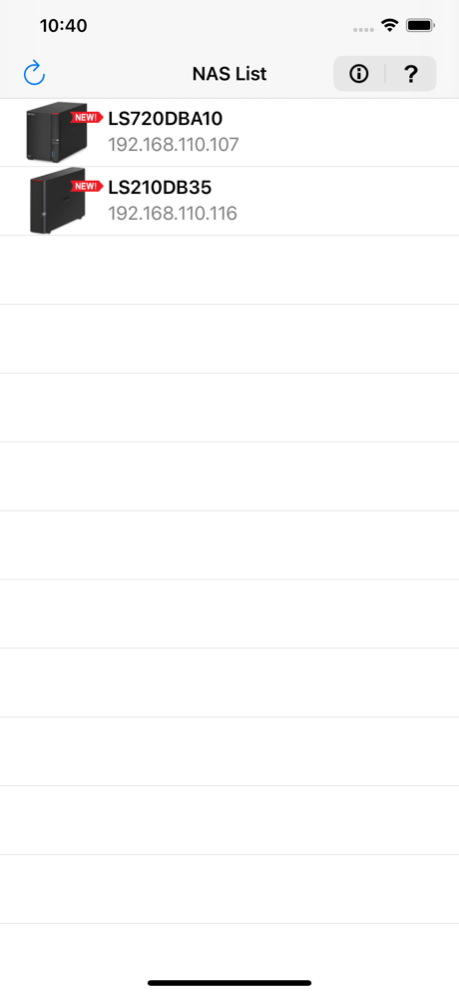
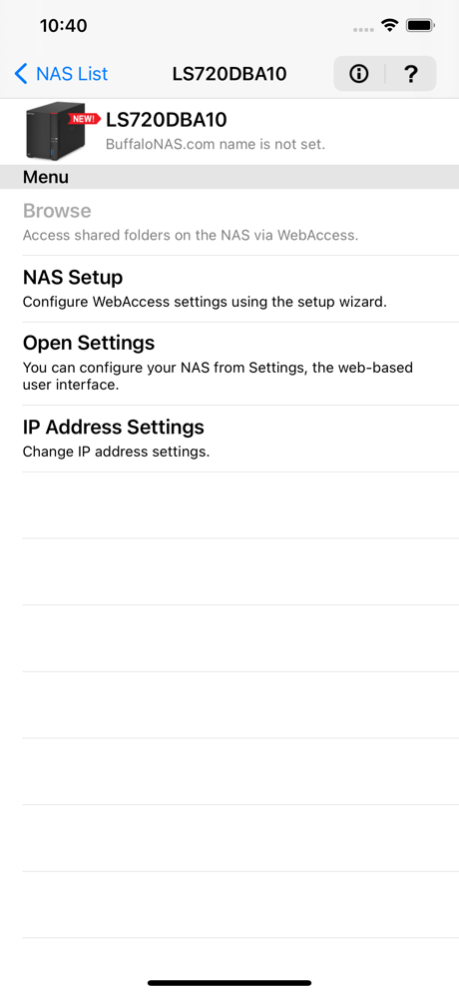
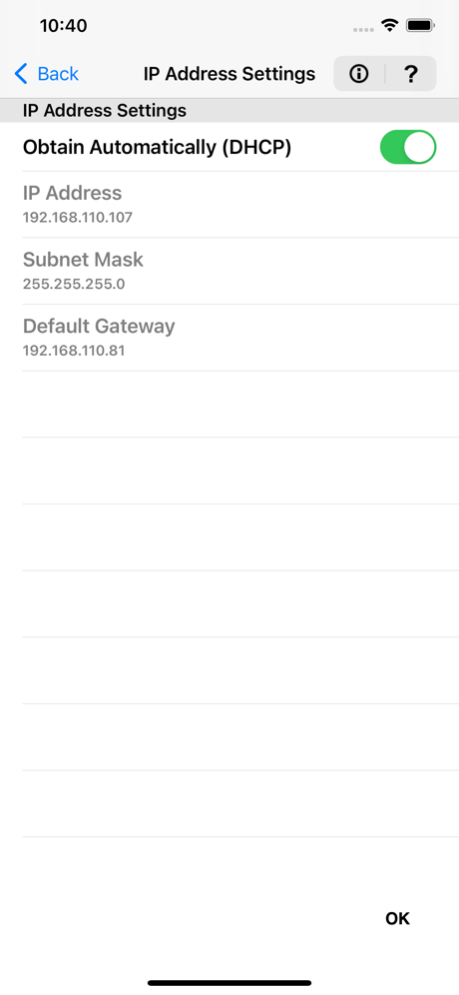
SmartPhone Navigator allows you to search for Buffalo NAS devices (LinkStations and TeraStations) on a network that the mobile device is also connected to. You may also use the app to manage any detected Buffalo NAS devices from your mobile device.
Features:
• WebAccess configuration: set up WebAccess directly from your mobile device, without needing a computer.
• Settings access: open Settings, the interface from you can configure the NAS device.
• IP address configuration: change the NAS device’s IP address remotely.
• Error and information events details: display error and information event messages, and their details.
Supported models:
○ LinkStation
• LS-WXBL series
• LS-YL series
• LS200 series
• LS400 series
• LS400X series
• LS500 series
• LS700 series
The following LinkStation series are only compatible if they are running firmware version 1.26 or later (version 1.34 or later is recommended).
• LS-AVL series
• LS-CHL series
• LS-QVL series
• LS-SL series
• LS-VL series
• LS-WSXL series
• LS-WVL series
• LS-WXL series
• LS-XHL series
• LS-XL series
○ TeraStation
• TS-6VHL series
• TS-8VHL series
• TS-QVHL series
• TS-RVHL series
• TS-WVHL series
• TS1000 series
• TS3000 series
• TS3010 series
• TS3020 series
• TS4000 series
• TS5000 series
• TS5010 series
• TS6000 series
• TS7000 series
The following TeraStation series are only compatible if they are running firmware version 1.32 or later.
• TS-RXL series
• TS-WXL series
• TS-XEL series
• TS-XHL series
• TS-XL series
Jun 21, 2021
Version 1.31
• Added a new feature that allows for the definition file, which contains Buffalo NAS device information and messages, to be updated.
• Fixed minor bugs.
About SmartPhone Navigator
The company that develops SmartPhone Navigator is BUFFALO INC.. The latest version released by its developer is 1.31.
To install SmartPhone Navigator on your iOS device, just click the green Continue To App button above to start the installation process. The app is listed on our website since 2021-06-21 and was downloaded 0 times. We have already checked if the download link is safe, however for your own protection we recommend that you scan the downloaded app with your antivirus. Your antivirus may detect the SmartPhone Navigator as malware if the download link is broken.
How to install SmartPhone Navigator on your iOS device:
- Click on the Continue To App button on our website. This will redirect you to the App Store.
- Once the SmartPhone Navigator is shown in the iTunes listing of your iOS device, you can start its download and installation. Tap on the GET button to the right of the app to start downloading it.
- If you are not logged-in the iOS appstore app, you'll be prompted for your your Apple ID and/or password.
- After SmartPhone Navigator is downloaded, you'll see an INSTALL button to the right. Tap on it to start the actual installation of the iOS app.
- Once installation is finished you can tap on the OPEN button to start it. Its icon will also be added to your device home screen.
Program Details
System requirements
Download information
Pricing
Version History
version 1.31
posted on 2021-06-21
Jun 21, 2021 Version 1.31
• Added a new feature that allows for the definition file, which contains Buffalo NAS device information and messages, to be updated.
• Fixed minor bugs.
version 1.30
posted on 2021-01-21
Jan 21, 2021 Version 1.30
• Added the product icons for the following LinkStation and TeraStation models: LS710D, LS720D, TS6200DN, TS6400DN, TS6400RN, TS3210DN, TS3410DN, TS3410RN, TS3220DN, TS3420DN, TS3420RN, TS5210DN, TS5410DN, TS5410RN, TS5810DN, TS51210RH
• Now supports iOS 14.
• Now supports Multitasking (Slide Over and Split View) on iPadOS.
• Improved app stability.
• Fixed other minor bugs.
version 1.21
posted on 2016-03-28
Mar 28, 2016 Version 1.21
This app has been updated by Apple to use the latest Apple signing certificate.
LS510D is now supported.
version 1.21
posted on 2016-03-28
Mar 28, 2016 Version 1.21
LS510D is now supported.
version 1.21
posted on 2016-03-28
28 Mar 2016 Version 1.21
This app has been updated by Apple to use the latest Apple signing certificate.
LS510D is now supported.
version 1.21
posted on 2011-10-26
version 1.21
posted on 1970-01-01
2016年3月28日 Version 1.21
LS510D is now supported.
Disclaimer
Official App Store Link
We do not host SmartPhone Navigator on our servers. We did not scan it for viruses, adware, spyware or other type of malware. This app is hosted by Apple and passed their terms and conditions to be listed there. We recommend caution when installing it.
The App Store link for SmartPhone Navigator is provided to you by apps112.com without any warranties, representations or guarantees of any kind, so access it at your own risk.
If you have questions regarding this particular app contact the publisher directly. For questions about the functionalities of apps112.com contact us.
